HoughCircles - finding false positives - help with parameters?

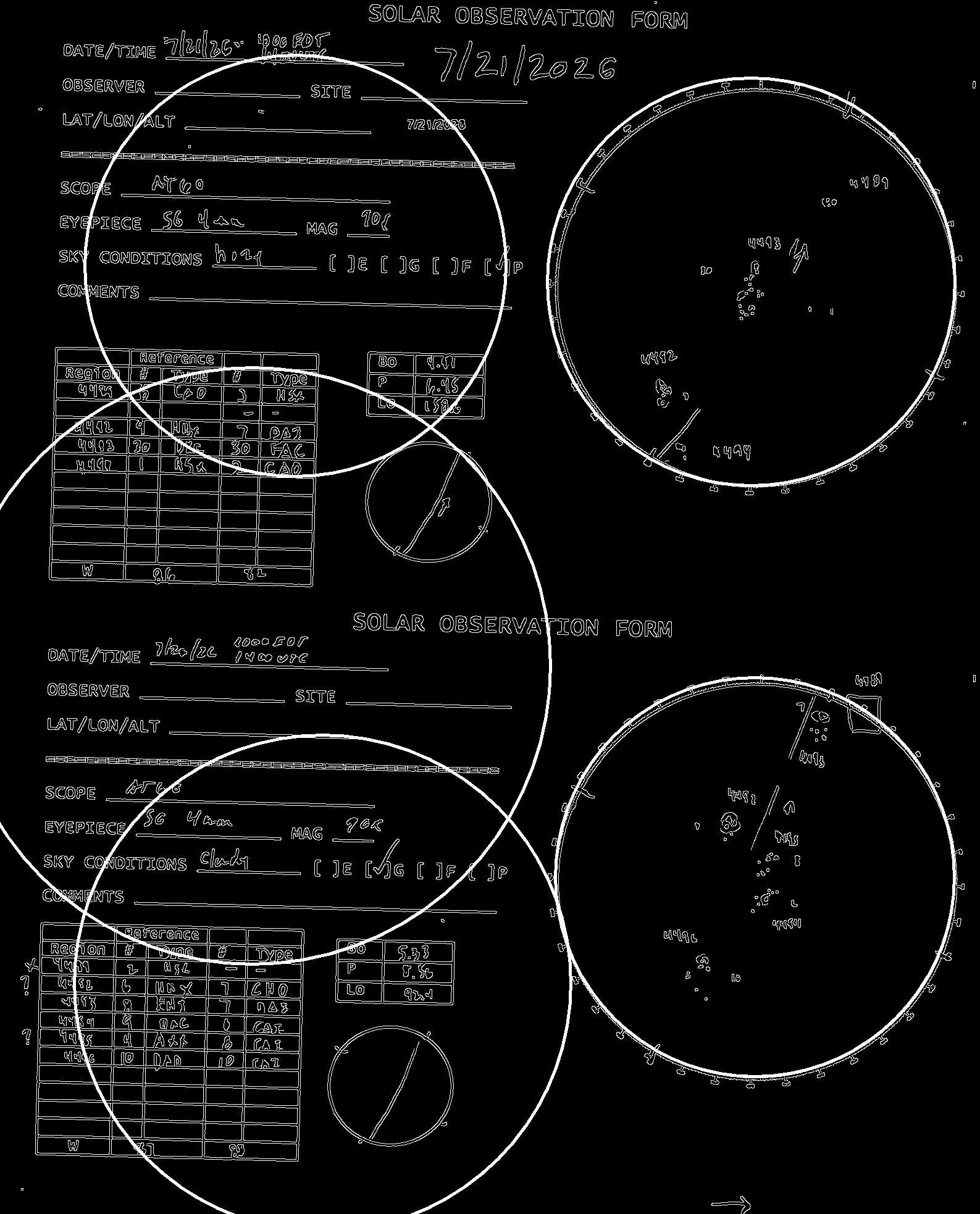
Hello all. Pretty new to Python and Open CV. The following code is detecting circles that don’t exist. I have tweaked the parameters quite a bit but can’t quite get rid of them. In the image, only the two on the right are correct and the circle to the upper right is actually somewhat offset as well. Any thoughts?

image = cv2.imread(image_path)
gray = cv2.cvtColor(image, cv2.COLOR_BGR2GRAY)
gray = cv2.GaussianBlur(gray, (7, 7), 1.5)
canny = cv2.Canny(gray,50,120)

circles = cv2.HoughCircles(canny, cv2.HOUGH_GRADIENT, dp=1, minDist=500,
param1=300, param2=50, minRadius=300,maxRadius=500)

in that picture, the circles are there.

you showed an output, an illustration, not an input.
the circles that you drew. nobody can remove them. removing them would result in an image that is different from your input.

if you have a picture that doesn’t have circles in those places, feel free to share it.

if you have a picture that isn’t Cannied, don’t withhold it either.


the trouble with HoughCircles is that it’s one big compound operation. you can’t take it apart like you should (separate into gradient step, accumulation step, peak finding step), and you can’t introspect it (look at the accumulator array).

it only has two modes, both gradient modes. your image already is a gradient image. this function will calculate the gradient of your gradient image. the result will be bad, no matter what you do.

it is simply a bad API. it has specific requirements that the docs don’t spell out, and it could be more useful, but can’t be, because nobody in 25 years has felt bothered enough to revise it.

you should not calculate the gradient explicitly.

you seem new to CV. Canny, Hough, and matchTemplate are newbie traps. Just because you see those demonstrated in some blog or video, doesn’t mean the authors have any clue what they are doing. they usually don’t, which is why they stick to demonstrating those APIs on toy examples.

those three APIs aren’t bad in general. they are tools. you have to know what they are good for.

when you need to drive a screw, you don’t drive it with a hammer, you drive it with a screw driver. when you have eggs, you don’t hammer them, you cook and peel them, or find a hen to hatch them. that’s the idea you should have about everything. “I have this problem. Is this the right tool?” and “I have this tool. is this the right problem?”

Thanks alot for the reply. Attached is the original image, before canny is called.

It is not clear where those three circles on the left are coming from. So if Hough is not a good algorithm, what would be the best way to detect circles? I know OpenCV is very powerful so I am guessing there must be a way.

Thanks

highlights:

  • Hough is generally useful, but OpenCV’s HoughCircles is a war crime
  • your circles are actually ellipses

the first big one has an aspect ratio of 645 : 640. that can throw canny off, unless you make its accumulator array sufficiently coarse (dp).


OpenCV’s HoughCircles is a terrible API.

in the case of HoughCircles, you need to feed it the uncannied data, because it runs a Canny on the data obligatorily.

for your data, I’d not want any Canny step at all. but you can’t have that, not with OpenCV.

only HoughCircles does that. the other Hough APIs in OpenCV don’t do that.

it seems to be made to detect filled circles only, not outlined circles (yours are outlined).

that’s why I say it’s a bad API.

honestly, I have no idea how to make OpenCV’s HoughCircles reliably find circles in data such as yours. it is incredibly sensitive to parameter choices. a good algorithm should not be that sensitive.

I wasted minutes on HOUGH_GRADIENT.

eventually I gave HOUGH_GRADIENT_ALT a try. that seems a LOT less fiddly.

also it’s more tolerant of ellipses. that might the an issue here. ellipses smear the peak they should leave in the accumulator array. you might get better results if your scans (photos?) are stretched right.

im = cv.imread("LunarSketch_0001.jpg", cv.IMREAD_GRAYSCALE)
(h, w) = im.shape[:2]

ar = 642 / 637 # measure the w/h of some circle
im = cv.resize(src=im, dsize=None, fx=1, fy=ar, interpolation=cv.INTER_AREA)

k = 11; im = cv.stackBlur(im, (k,k))
# https://docs.opencv.org/4.13.0/dd/d1a/group__imgproc__feature.html#ga47849c3be0d0406ad3ca45db65a25d2d
# read carefully what param1 and param2 do depending on method
circles = cv.HoughCircles(
    im,
    method=cv.HOUGH_GRADIENT_ALT,
    dp=1.5,
    minDist=100,
    param1=300,
    param2=0.90,
    minRadius=80,
    maxRadius=400,
)
assert circles is not None, circles

print(len(circles))

canvas = cv.cvtColor(im, cv.COLOR_GRAY2BGR) >> 1
for (x, y, r) in circles[0]: # (opencv-python 5 puts these in a row, not a column...)
    cv.circle(canvas, center=(int(x), int(y)), radius=int(r), color=(0, 255, 0), thickness=2, lineType=cv.LINE_AA)
    cv.circle(canvas, center=(int(x), int(y)), radius=2, color=(0, 0, 255), thickness=-1)

Even with all that, I can’t get the detections to be accurate. they are off. that should not be so, but thanks to whoever designed HoughCircles and everyone who didn’t fix it nor point it out since then, it is what it is.
Hi Christoph,

I can’t thank you enough for putting so much effort into this. Your tips in the last post are exactly what I needed and I can now find the circles with as much accuracy as I actually needed. Thank you so much.

I laughed so hard when I read you comment about the function being a “war crime”. Hysterical!

Thanks alot!

Cheers,
Dave

BTW, you can find circles another way. you can find contours, then assess each contour for its circularity. that might be a lot more accurate here.

Yes, I read about that. Seems a bit tricky and, honestly, Hough actually does a good enough job for my use case.