Hey everyone,
As a developer working on SLAM and Computer Vision projects in C++, I was constantly frustrated by the lack of proper debugging tools in VS Code after moving away from Visual Studio’s Image Watch. Staring at memory addresses for cv::Mat and std::vector<cv::Point3f> felt like debugging blind!
So, I decided to build what I needed and open-source it: CV DebugMate C++.
It’s a VS Code extension that brings back essential visual debugging capabilities for C++ projects, with a special focus on 3D/CV applications.
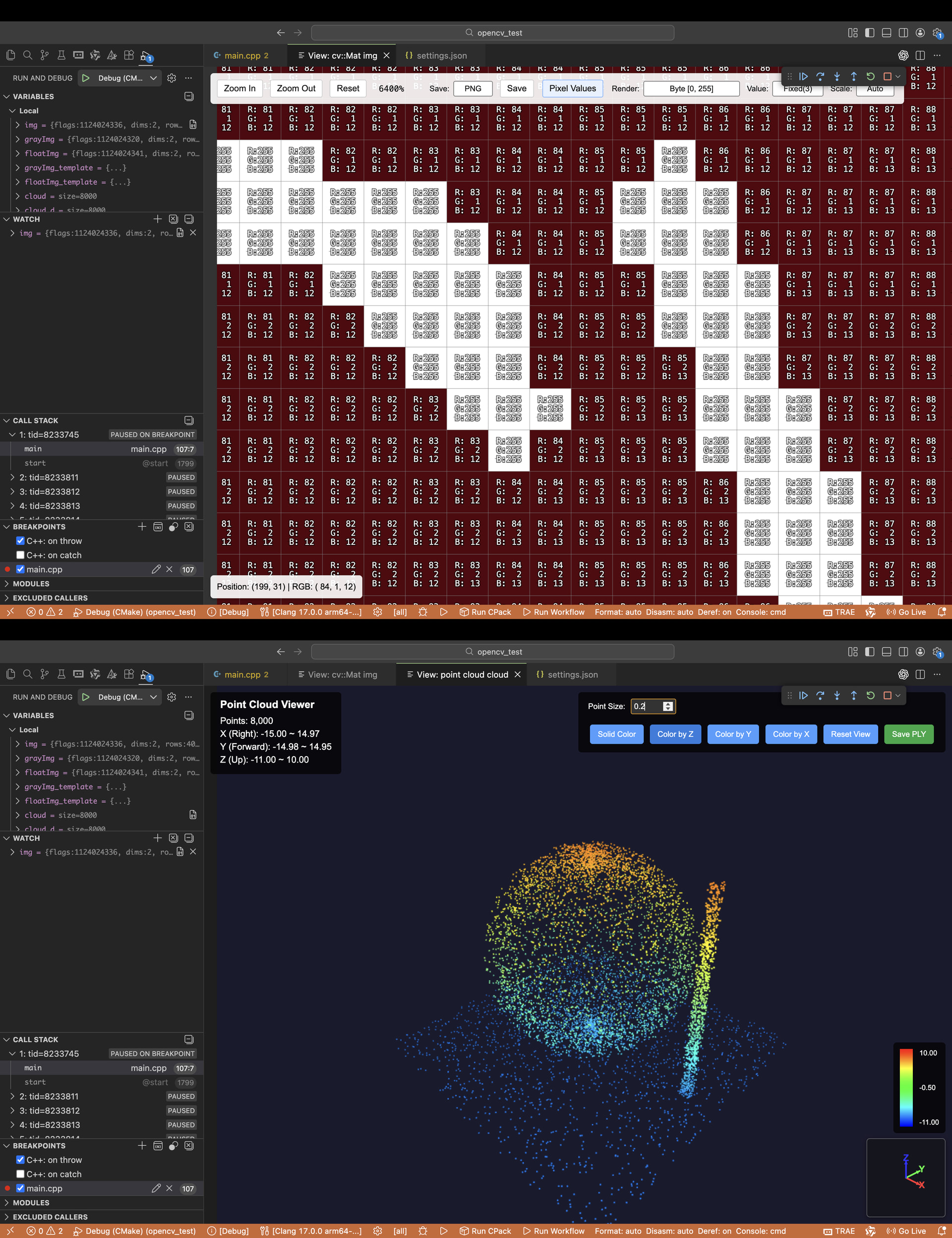
 Key Features
1. Powerful cv::Mat Visualization
-
Diverse Types: Supports various depths (uint8, float, double) and channels (Grayscale, BGR, RGBA).
-
Pixel-Level Inspection: Hover your mouse to see real-time pixel values, with zoom and grid support.
-
Pro Export: Exports to common formats like PNG, and crucially, TIFF for preserving floating-point data integrity (a must for deep CV analysis).
2. Exclusive: Real-Time 3D Point Cloud Viewing (The Game Changer)
-
Direct Rendering: Directly renders your
std::vector<cv::Point3f>orcv::Point3dvariables as an interactive 3D point cloud. -
Interactive 3D: Built on Three.js, allowing you to drag, rotate, and zoom the point cloud right within your debugger session. Say goodbye to blindly debugging complex 3D algorithms!
3. Wide Debugger Support
- Confirmed compatibility with common setups: Windows (MSVC/MinGW), Linux (GDB), and macOS (LLDB). (Check the documentation for the full list).
 How to Use
It’s designed to be plug-and-play. During a debug session, simply Right-Click on your cv::Mat or std::vector<cv::Point3f> variable in the Locals/Watch panel and select “View by CV DebugMate”.
 Get It & Support
The plugin is completely free and open-source. It’s still early in development, so feedback and bug reports are highly welcome!
-
VS Code Marketplace: Search for CV DebugMate or zwdai
-
GitHub Repository: GitHub - dull-bird/cv_debug_mate_cpp: CV DebugMate C++: A Visual Studio Code extension for visualizing OpenCV data structures during C++ debugging.
If you find it useful, please consider giving it a Star on GitHub or a rating on the Marketplace—it’s the fuel for continued bug fixes and feature development! 